Start2Win
Based on your boat position and speed it computes if you cross the start line on time, too late or too early.All you need to do is enter the end points of the start line.
You do this by navigating to starboard and port marks of the start line and hit the respective button in the app.
Then you enable the countdown timer and are ready to race!
Here is part of the the official manual:
1.
FunctionalityStart2Win is an Android app for smart phones and tablets.
It supports the racing sailor to start perfectly.During the pre-start phase you sail to the start boat and start buoy and take their coordinates by simply tapping the respective button.
The start line and the current position are displayed on the Google Map.
To complete the setup, the built in count down timer needs to be synchronized with the starting time.Based on the current position, the speed and bearing, Start2Win calculates when the start line will be crossed.
It can now be estimated if the start line will be reached before, at, or after the start signal.The sailor can now decide how to steer to assure he arrives at the start line at the optimal point in time.During the pre-start phase skipper and crew are rather busy navigating their boat as well as observing other boats.
So there is hardly any time to read displays.
Utilizing the new “Audio Vario 2 Start” logic, Start2Win provides the most important information acoustically.
The logic is anticipated from the well known Variometer used in gliding and paragliding.There it is the valuable information about climbing and descending, here it is the early or late arrival at the start line.
The sailor optimizes the start tactics based on estimation and announcement.
Of course proper seemanship must not be jeopardized when using this application.We wish a great start to win the race!
2.
Prior to your first race with Start2WinIt will be helpful to adjust some settings prior to the first use of Start2Win in a race and get familiar with the app.
Boat SettingsEntering a reasonable value for the maximum boat speed prevents false calculations of the arrival time at the start line in case the GPS module provides a wrong value.
This happens rarely, but it can happen.The GPS module supplies rather inaccurate values when moving rather slow.
This will also affect calculation and may lead to false estimations.
Normally there is no need to select a larger value than the default, entering smaller values needs to be handled with care.
UnitsEnter your preferred values here.
Audio Vario and Count DownYou can mute both acoustic outputs here.
Don’t forget to un-mute prior to the race so that you don’t need to read the display permanently.
3.
Fixing the start lineWe are on the water, the race committee has set the start line.
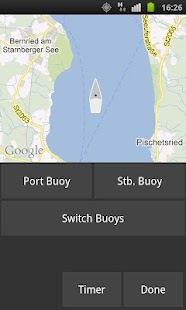
First off, Start2Win needs to know the start line, otherwise it is rather useless.Tap Startline in the Map View.
Navigate to the starboard edge and tap Stb Buoy; do the same for the port end of the start line and tap Port Buoy.Tip: For the first few times you may want to set the points a little inside and towards the pre-start area.
This adds some safety buffer to avoid early starts.Should the race management decide to modify the start line, one of the two, or even both end point positions of the start line can always be re-entered as described above.Should you have mixed up Stb.
and Port buoy positions, or the race is started from the other side of the start line, you can always tap Switch Buoys.
4.
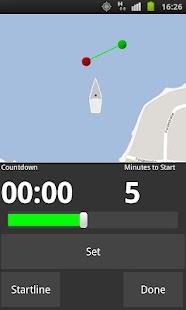
Synchronizing the start timeTap Timer in Map View.
Use the slider to adjust the minutes to the start.
Tap Set to synchronize with the respective signal of the race management.Re-set the timer if it was not accurate enough at a later race committee signal.
About Start2Win
- Package name (App ID)
- com.nosedowncomputing.start2win
- Available on
- Google Play
- Price
- Free
- Version
- v1.3.1
Looking for the Start2Win APK?
The safest way to get Start2Win (com.nosedowncomputing.start2win) on your Android device is to install it directly from Google Play — you'll always get the latest official version, automatic updates, and no risk of modified or infected APK files from third-party sites.
Music Features
Enjoy high-quality music streaming and playback features.
Gaming Features
Enjoy immersive gaming experience with various game modes.
Fitness Tracking
Track your workouts and monitor your health metrics.
See Start2Win in Action

Frequently Asked Questions
Is Start2Win free?
Yes, Start2Win is free to download and install on Android through Google Play.
How do I install Start2Win on Android?
Open Google Play on your Android phone or tablet, search for Start2Win or tap the Google Play button on this page, then tap Install. The app downloads and installs automatically.
What is com.nosedowncomputing.start2win?
com.nosedowncomputing.start2win is the App ID (package name) of Start2Win on Google Play. Every Android app has a unique package name, and it is the safest way to verify you are installing the official app.
Is Start2Win safe to download?
Installing Start2Win from Google Play is the safest option: you get the official version, verified by Google Play Protect, with automatic updates. Avoid APK files from unofficial third-party sites.
Get Start2Win Today
Start2Win for Android — free download on Google Play.
Compatible with Android phones and tablets — available on Google Play.
Ask AI about this app
Get instant answers about features, tips and more from popular AI assistants.